




Bead Rev

By dragonfish
- 2,059 views
- View dragonfish's images
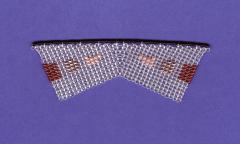
Done! ...finally... I told someone I would post up a picture of this if and when I finished it. Just got around to scanning it (makes much clearer images, no camera shake). Most of the beads are seed beads. The LE is about 3 3/4 in across and has a wire in it. It was supposed to be a pin, but I had too much trouble figuring out how to attach some wire as the vertical spars and make a pin attachment. I'll probably put a couple jump rings on the LE and safety pin it from the back.
Copyright
© dragonfish
Recommended Comments
Join the conversation
You can post now and register later. If you have an account, sign in now to post with your account.