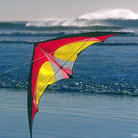
June 17, 20233 yr comment_87850 View Advert Looking for Flying Wings Beetle 2100+ kite in new or like new condition, and Only in the 2 color patterns pictured Hi, I am looking to buy Flying Wings Beetle 2100, or 2100+ kite in new or like new condition, but ONLY in the 2 color patterns in the pictures. These are the older Beetle 2100 kites with the solid carbon rods, Not the .157 hollow leading edge rod version. Leading edge uses .135 solid carbon rods, and spreader is .125 solid carbon rod. Let me know if you have one by PM. Thanks Advertiser cjay Date 06/16/2023 Price $100 Category Kites (Dual Line) Brand Flying Wings Model Beetle 2100 Report
June 18, 20233 yr comment_87853 Hey Cjay, Contact Old City Kites in Sacramento, CA. I know as of yesterday they had quite a few beetles and also the high wind kits for them. Anne and Anwar are good people. Report
May 24, 20242 yr comment_93821 I have the kite you're looking for. Only flown a few times, in like new condition. It's the one in the larger picture. Report


Join the conversation
You can post now and register later. If you have an account, sign in now to post with your account.