Skip to content
View in the app

A better way to browse. Learn more.

KiteLife Forum

A full-screen app on your home screen with push notifications, badges and more.

To install this app on iOS and iPadOS
  1. Tap the Share icon in Safari
  2. Scroll the menu and tap Add to Home Screen.
  3. Tap Add in the top-right corner.
To install this app on Android
  1. Tap the 3-dot menu (⋮) in the top-right corner of the browser.
  2. Tap Add to Home screen or Install app.
  3. Confirm by tapping Install.

April Is AKA National Kite Month

Featured Replies

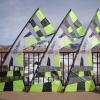
Just setup a Kite display for AKA National Month at Woodridge Elementary in Bellevue, WA. Fun stuff complete with kites, kite pins, kite books, and old magazine articles.
What do you have planned? ;)
8571268176_475f813db1_z.jpg
8571268430_e642359bb3_z.jpg
8570175253_1bb71920ab_z.jpg
8570175581_88e042738e_z.jpg

8570175955_b1402af594_z.jpg

Join the conversation

You can post now and register later. If you have an account, sign in now to post with your account.

Guest
Reply to this topic...

Account

Navigation

Search

Search

Configure browser push notifications

Chrome (Android)
  1. Tap the lock icon next to the address bar.
  2. Tap Permissions → Notifications.
  3. Adjust your preference.
Chrome (Desktop)
  1. Click the padlock icon in the address bar.
  2. Select Site settings.
  3. Find Notifications and adjust your preference.