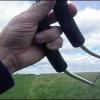
July 6, 201313 yr comment_36545 Had a bit of wind on the morning of the fourth, so I decided to put my Hypnotist up for the first time. In the spirit of the day, I went to the dollar store and got rolls of red, white and blue crepe streamers, and a couple of flags. Put the flags at the top of the lines, and 100' of streamers off of each wing tip. She was a bit heavy, but I had some fun. Lost some of the streamers, so I had to chop 'em to about 30'. Flew better then. I also got to try something new to me. Couldn't fly well and take a picture, so I tied one strap to my waist and flew with my left hand and right hip, and used my right hand to work the camera. Caught the ground twice, more due to trying to see through the camera than trouble with control when I was paying attention to tthe kite. Fun morning, even if I did catch a bit of a burn. Some pictures; Report
July 6, 201313 yr comment_36551 Like the pictures & the description of how you took them. I've been trying to come up with some way of taking a few myself. The several pictures I have of me flying kites were taken by my wife & daughter but they don't go with me when I'm flying very often. Really like the flag idea too. Report
July 6, 201313 yr comment_36555 Good looking kite ! Nice decorations, too Wonder how that 100' tube is going to work out Report


Join the conversation
You can post now and register later. If you have an account, sign in now to post with your account.